AI affiliate video generator tutorial: from product source to editable 9:16 draft
An AI affiliate video generator is most useful when it gives you control over the product facts, script, shots and final edit—not when it hides the whole job behind one “generate” button. The xplaai english-affiliate-video-auto-edit Skill takes an English script plus a verified product image, product link or approved research source; measures the narration; creates product-aware keyframes with GPT Image 2; generates native 9:16 clips with Veo 3.1 Fast; and prepares separate video, voice and product-image tracks in a local CapCut draft.
This tutorial shows the exact input, model roles, dry-run checks, real 32.34-second output and commercial use cases. The current workflow creates English-language creative. It does not guarantee views, affiliate commissions, ad approval or a finished publish-ready edit.
Watch the verified case, install the Skill in Codex, or create an xplaai API key.

Quick answer: what does this affiliate video Skill produce?
Give the Skill an English script or approved selling points and a traceable product source. It first reports the voice mode, measured narration duration, anchor and keyframe counts, Veo task count, reusable assets and planned CapCut tracks. After you approve the paid calls, it creates separate native 9:16 clips and an editable local CapCut draft rather than flattening every decision into one irreversible file.
The current release manifest identifies version 0.2.0, separate member packages for Codex and WorkBuddy, and a public 720×1280 case. Package access and xplaai API usage are separate. Check the live Skill page again before purchasing or publishing because access and model availability can change.
Which models and tools are actually used?
The workflow is a coordinated production pipeline. No single model writes, voices, animates and edits the finished affiliate video.
| Production step | Verified model or tool | What it does | What it does not do |
|---|---|---|---|
| Agent orchestration | Codex or WorkBuddy | Reads project files, runs doctor and dry-run, coordinates approved tasks and resumes failed assets | Does not approve spend or product claims for you |
| Narration | POST /v1/audio/speech through xplaai |
Creates the formal WAV and supplies the measured timing used by the edit | Does not verify the script or choose legal disclosures |
| Keyframes | POST /v1/images/generations; gpt-image-2 |
Builds the product, presenter/world and style anchors, then shot keyframes | Does not replace the real product image or typeset reliable product text |
| Video clips | POST /v1/videos; veo-3.1-fast |
Creates separate native 9:16 video windows, normally planned in approximately 8-second generation units | Does not create the final multi-track CapCut project |
| Editable handoff | Local CapCut draft adapter | Keeps generated clips, formal voice and product photos on independent tracks | Does not add finished captions by default |
| Optional preview | Local assembly and FFmpeg | Joins clips for a clean review MP4 and replaces model audio with the formal narration | Does not publish to TikTok, Reels or Shorts |
The image and video model names above are verified defaults in the current Skill source. A live package may allow configuration changes, so the dry-run—not an old marketing screenshot—must be the source of truth for a new project.
What you need before generating a TikTok affiliate video
1. A traceable product source
Choose one of four valid source modes:
- a product image and link supplied by you;
- a product link supplied by you;
- a product image supplied by you;
- explicit authorization to research the product.
The workflow records the chosen source in product-source.json. A link-only project needs a permitted product image before live generation. An image-only project can describe visible details, but it cannot invent price, ingredients, specifications, ratings or benefits that the image does not prove.
Use the real product image as an independent overlay asset. Do not ask an image model to recreate the package, label, book cover or logo and then treat the recreation as factual product evidence.
2. An original English script
The script should include:
- the viewer problem and first-two-second hook;
- product facts supported by the approved source;
- the mechanism or practical reason the product may help;
- limitations, exclusions and prohibited claims;
- a short CTA linked to the visible product destination;
- an affiliate disclosure when the placement is commercial.
A reference video can help you study pacing, objections or audience language. It does not give permission to copy the creator’s people, dialogue, screenshots, voice, shot sequence or unverified claims.
3. A publication brief
Record the target platform, audience, aspect ratio, brand constraints, pronunciation, caption style, rights status and review owner. For health, legal, tax, financial or other regulated topics, add a mandatory claims review and qualified local review before publication.
Copy this first-run task template
Use english-affiliate-video-auto-edit for an original English affiliate explainer.

Audience: US TikTok users researching [product category]
Primary keyword/topic: [specific viewer problem]
Product source mode: [image + link / link / image / authorized research]
Approved product source: [local file or URL]
Script: [path to the approved English script]
Required facts: [source-backed facts only]
Prohibited claims: [claims the video must not make]
Disclosure: [affiliate or sponsored disclosure]
Visual direction: American Webcomic Explainer
Output: native 9:16 source clips + editable local CapCut draft

Run doctor and a dry-run first. Do not make paid calls.
Report the voice mode, measured narration duration, speech-call count,
three anchors, total keyframes, Veo task count, reusable assets,
CapCut tracks and manual review points. Wait for my approval.
This prompt is deliberately specific. It connects the search topic, product evidence, model plan, spend checkpoint and final handoff in one reviewable instruction.
Full AI affiliate video workflow
Step 1: install the correct Agent package and run doctor
Codex and WorkBuddy use separate packages. Download only through the authenticated Skill page, install locally and run the package’s scripts/doctor.py. Keep the xplaai key in the operating system credential store or current process environment; never paste it into a ZIP, source repository, screenshot or article.
Doctor should confirm that the expected scripts, Python dependencies, FFmpeg, local draft prerequisites and credential state are available. A missing variable can be named, but its value must never be printed.
Step 2: stage the product source
The Skill records the link and stages the permitted image before it writes visual prompts. If the page is researched, record displayed prices, sales counts, ratings, review counts, image URLs and any conflicts as observations with date and source. Do not convert a store-wide number or old screenshot into a product performance claim.
Reject the input if the only usable “product image” is an AI recreation containing unreliable text. The production track should contain the actual supplied or permitted product image so it can be moved, replaced or deleted later.
Step 3: select one, two or three voices from the script
Voice count follows actual turn-taking:
- use one narrator for continuous education, review or marketing prose;
- use two voices for an explicit question-and-answer exchange or quoted objection and response;
- use three only when the script clearly contains a narrator and two distinct characters.
Do not add characters merely to make the edit sound busy. The formal audio is generated first, measured and kept as its own editable WAV track. If a deliberately fast cut needs retiming, measure the delivered speech before applying any speed adjustment. Preserve the original formal audio so a rushed role can be corrected without rebuilding the entire video.
Step 4: let narration duration determine the shot plan
The Skill does not compress every script into 30 seconds. A 30-, 60-, 90-second or custom edit changes shot count and density; it should not silently rewrite the user’s meaning.
The plan uses approximately 8-second Veo windows as generation units. A normal window contains two connected camera beats. Before live generation, inspect:
- measured WAV duration;
- total and per-role speech pace;
- longest dialogue turn;
- number of video windows;
- first-two-second hook;
- early and final product placements;
- expected API calls.
For a short commercial format, the real product normally appears in roughly the first 10–15% of runtime and again in the final 10–15% CTA window. It should not sit centered over the entire video.
Step 5: approve the three visual anchors
The pipeline establishes three visual references:
- product visual;
- presenter/world;
- style first frame.
In the American Webcomic direction, the target is original 2D flat cel shading, clean dark linework, saturated color blocks, expressive adult characters and readable phone composition. Generated images should contain no fake product labels, logos, watermarks or invented documents. Review the three anchors before fan-out; otherwise one wrong identity choice can multiply across every shot.
Step 6: generate keyframes and native 9:16 Veo clips
After anchor approval, GPT Image 2 produces connected shot keyframes and Veo 3.1 Fast produces the planned native 9:16 windows. The workflow keeps every successful clip. If one task fails, resume only that asset rather than deleting paid outputs and starting again.
Native vertical generation is the default for this Skill. Converting old horizontal footage into a vertical canvas is a compatibility fallback, not the normal creative treatment.
Step 7: build the editable CapCut draft
The normal handoff contains:
generated-video: one generated clip per timeline window;voice-editable: the formal narration as a separate audio track;product-overlay-editable: the real product image in removable, repositionable photo clips;- no text or caption track by default.
The draft is designed for human finishing. Add and review captions, caption animation, product placement, music, transitions, audio levels, platform safe areas, disclosure and CTA in CapCut. Only authorize a live write into the local CapCut project store after reviewing the declarative draft specification, and avoid writing while CapCut is actively editing the same project.
Step 8: run a publication QA pass
Before export, verify:
- the final duration follows the approved narration;
- the draft canvas is 1080×1920;
- clips remain individually editable;
- narration is separate and speed-adjustable;
- the product image can be moved or removed;
- no unwanted model audio remains in the clean preview;
- captions are readable and inside the safe area;
- every spoken product claim matches the source;
- affiliate disclosure and platform rules are satisfied;
- output files contain no key, private package link or signed URL.
Real case: 32.34-second American Webcomic explainer
The public case is a real delivered MP4, not a stock mockup.
| Evidence | Verified value |
|---|---|
| Duration | 32.34 seconds |
| Frame | 720×1280, vertical 9:16 |
| Video | H.264 |
| Audio | AAC, stereo |
| Visual format | American Webcomic explainer |
| Visible structure | viewer tension → simple idea → product/book visual → relief → CTA |
| What it proves | the Skill can deliver a vertical animated affiliate explainer and public preview |
| What it cannot prove | clicks, orders, commission, ad approval or repeatable performance |
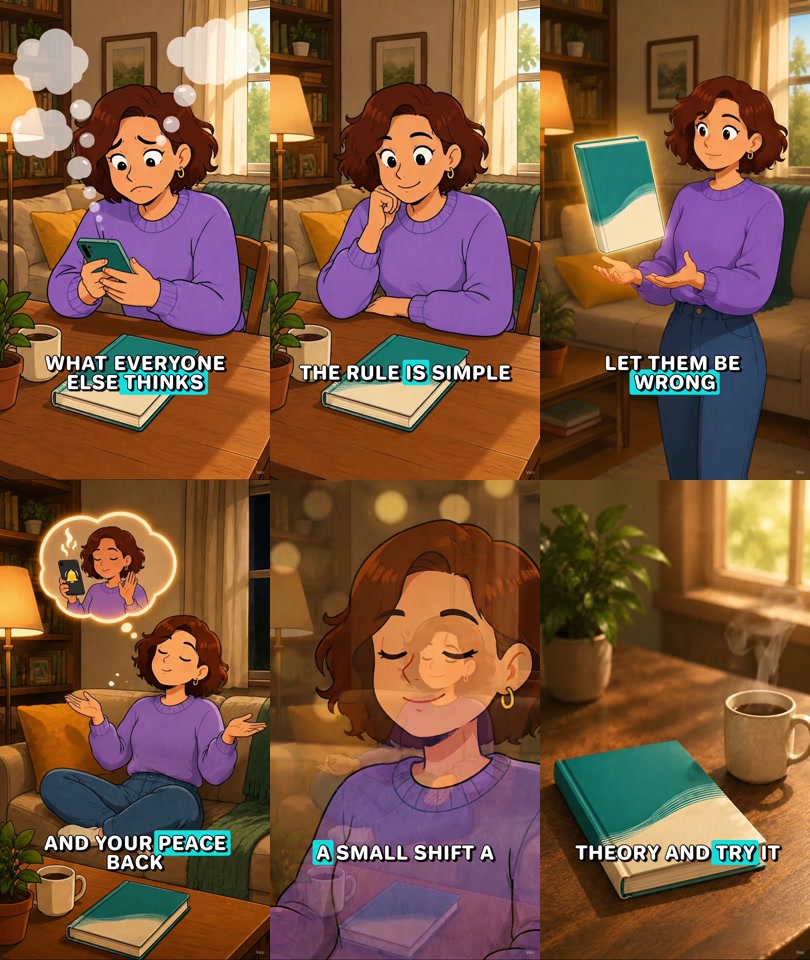
The case includes captions in the public preview, but the normal editable handoff does not bake captions into source clips. That distinction matters: the public video demonstrates one finished review output, while a new project keeps caption decisions editable.

Can this workflow make money?
It can create a commercial content asset; that is different from proving monetization. The current public evidence does not include an authorized affiliate dashboard, order record, revenue period or cost calculation. Therefore this page calls it a real production case, not a real income case.
Practical routes include:
Affiliate product education
Use the video to explain a source-backed product problem, show the real item and send viewers to a disclosed affiliate link. Track impressions, hold rate, clicks, conversion, refunds and net commission separately. The Skill cannot guarantee any of them.
Creative service for brands or sellers
Package product intake, claims review, English script, approved anchors, source clips, editable CapCut draft and a defined number of revisions as a client deliverable. Quote from real labor, model calls and revision risk—not a fabricated market rate.
Creative testing for an owned store
Keep the product source constant while testing different hooks, objections and CTAs. One variable per version makes results easier to interpret. Do not describe model-generated lifestyle imagery as customer testimony.
Educational creator content
Use the webcomic format for books, tools or practical concepts, then connect it to a newsletter, product page or other owned destination. Platform monetization requires the account to meet current eligibility and originality rules.
To publish a genuine monetization case later, retain authorization, account identity, date range, traffic source, clicks, attributed orders, gross commission, media/model cost, refunds and a clear “individual results vary” note.
AI affiliate video Skill vs a single video API
| Need | Use the Skill | Use an API directly |
|---|---|---|
| Repeatable product intake and source record | Best fit | You must build it |
| Narration-driven shot count | Included in the workflow | You must calculate and orchestrate it |
| Three reviewed anchors | Included | You manage references and state |
| Separate clip retries | Included | You build task persistence |
| Editable CapCut handoff | Included | You build the draft adapter |
| One custom video task in your own app | More workflow than needed | Better fit |
| Full control over queue, UI and storage | Constrained by the Skill | Better fit |
For a custom application, read the GPT Image 2 API guide and Veo 3.1 Fast API guide. For a repeatable creator workflow with review gates and editable assets, use the Skill.
Frequently asked questions
Is this an AI affiliate video generator for TikTok?
It creates native 9:16 source clips and an editable CapCut draft suited to TikTok-style vertical production. You must still review current TikTok disclosure, advertising, AI-content and safe-area requirements before publishing.
Can it create Reels and YouTube Shorts?
The vertical 9:16 assets can be adapted for Reels and Shorts. Review captions, duration, music rights, CTA and each platform’s current policies separately.
What product input is required?
Provide a permitted real product image, a product link or explicit authorization to research. A live project must have a source record and usable product image unless you explicitly request a visual-only draft.
Which AI models does the Skill use?
The current verified defaults use xplaai speech for narration, GPT Image 2 for anchors and keyframes, and Veo 3.1 Fast for native 9:16 clips. Local tools prepare the CapCut draft and optional preview.
Does it copy a reference video?
No. A reference is limited to research about pacing, audience and problem framing. The new script, characters, visuals, voice and edit must be original and rights-cleared.
Are captions generated automatically?
Captions are optional separate artifacts and are not baked into the normal handoff. Add and review the final text track in CapCut.
How long is the output?
Duration follows the measured narration. Thirty-, sixty- and ninety-second presets guide pacing and shot density; they do not force the script into a fixed length.
How much does one video cost?
There is no truthful fixed number without the approved voice turns, anchors, keyframes, Veo windows, reusable assets and current API pricing. Run a dry-run, review the exact task counts and check live xplaai pricing before approving paid calls.
What happens when one Veo task fails?
The workflow retains successful assets and retries only the missing or failed item where supported. It should not regenerate the entire project by default.
Does the public case prove affiliate income?
No. It proves a real 32.34-second vertical deliverable. There is no authorized revenue, order, click or cost evidence attached to that case.
Can I use Codex or WorkBuddy?
Yes, but they use separate member packages. Select the matching Agent on the authenticated product page, install it locally, run doctor and approve the dry-run before paid generation.
Review the case, then start with a dry-run
Watch the real American Webcomic case, choose the correct Codex or WorkBuddy package, and create an xplaai API key. Your first project should stop after doctor and dry-run so you can approve the source, voice mode, model tasks, expected usage and editable tracks before generation.