Use a unified AI API without flattening model contracts
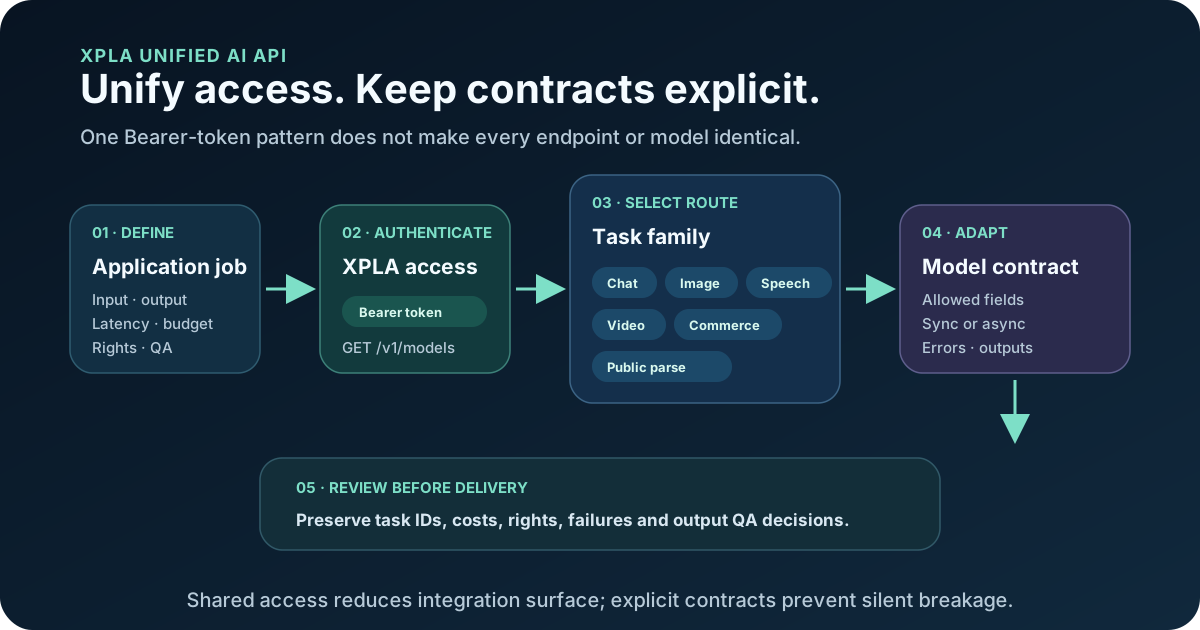
XPLA gives developers one account, one base URL and a Bearer-token pattern across several verified AI and commerce route families. The word unified applies to access and route discovery—not to a universal request body, response, price, latency or model contract.
Use the route decision matrix below, read the API documentation, or create an API key when you are ready to run one small contract test.
Choose the route before the model
An AI product rarely stops at one prompt and one response. A commerce workflow may need to research a product, create a visual, animate it into a short video, produce a voiceover and then hand the result to an automation.
xplaai exposes these jobs through task-oriented API routes:
| What you want to build | API route | Request pattern |
|---|---|---|
| List models available to a token | GET /v1/models |
Synchronous JSON |
| Generate or edit an image | POST /v1/images/generations |
Synchronous for supported models |
| Generate or edit a video | POST /v1/videos |
Asynchronous task |
| Check a video task | GET /v1/videos/{task_id} |
Poll by task ID |
| Retrieve video content | GET /v1/videos/{task_id}/content |
Fetch when the task is ready |
| Run a chat completion | POST /v1/chat/completions |
Chat Completions contract |
| Generate speech | POST /v1/audio/speech |
Text-to-speech request |
| Search TikTok Shop data | GET /v1/tiktok/shop/search |
Commerce-oriented search |
| Get TikTok product data | GET /v1/tiktok/product |
Product lookup |
| Parse a public video | POST /v1/video/parse |
Public-video analysis |
The base URL is https://xplaai.com. The current documentation is the source of truth for available models, accepted parameters and response fields.
Start with model discovery, not a copied model name
Keep the real key outside source code, screenshots, browser JavaScript and shared prompts. In a server-side shell, assign it to an environment variable and list the models currently available to that token:
export XPLA_API_KEY="your_api_key"

curl --request GET \
  --url https://xplaai.com/v1/models \
  --header "Authorization: Bearer $XPLA_API_KEY"
Treat the response as a current capability input, not a permanent catalog. A model name found in an old article may no longer match the account, route or contract you are testing.
Before exposing a model in your product:
- record the exact public model name;
- link it to one endpoint family;
- store the permitted input fields;
- store whether the result is synchronous or asynchronous;
- set a test budget and approval gate;
- define the output checks your user actually needs;
- preserve the date of the last successful contract test.
A unified API does not mean identical parameters
Image and video models do not all accept the same inputs. Resolution controls, reference media, duration and aspect-ratio options can differ by model.
xplaai treats the public model name as a parameter-contract boundary. Your application should:
- select the model explicitly;
- send only the fields documented for that model;
- validate model-specific inputs before creating the request;
- handle the response pattern for that endpoint;
- keep a visible mapping between your user-interface options and the selected model contract.
This is especially important when an application offers several models behind one interface. A setting supported by one model should not be silently forwarded to another model that interprets it differently.
How the video workflow differs from image generation
Supported image-generation requests can return their result in the initial response. Video creation is asynchronous because a render takes longer:
- send a request to
POST /v1/videos; - store the returned task ID;
- poll
GET /v1/videos/{task_id}; - when the task is ready, retrieve the result through
/v1/videos/{task_id}/content.
Build task state, retry behavior and user-facing progress into the product from the beginning. See the AI video API guide for the complete request flow.
Is xplaai OpenAI-compatible?
The chat route follows the OpenAI Chat Completions contract. Do not assume that every xplaai media route uses an OpenAI request shape. Image and video generation use xplaai's documented endpoints and model-specific fields.
If you are migrating an existing integration, review each endpoint separately instead of applying a global compatibility flag.
APIs for building; Commerce Skills for running workflows
Use the API when you want to own the application logic, database, interface and orchestration.
Use a Commerce Skill when you want a packaged workflow that coordinates several steps—for example, turning product materials into short-form creative or converting pet footage and copy into an edited video workflow.
xplaai provides separate skill packages for Codex and WorkBuddy. Public case pages may explain the workflow, while member packages and private download locations remain access-controlled.
Choose your next integration
- Start with the AI image generation API for product visuals, reference-guided generation and image editing.
- Start with the AI video API for text-to-video, image-to-video and supported video-editing workflows.
- Use the current API documentation for text-to-speech and chat-completion request details.
- Explore Commerce Skills when you need a reusable end-to-end workflow instead of a single model call.
Limits to plan for
- One key does not mean one schema.
- Not every route is OpenAI-compatible.
- Model lists and account availability can change.
- Route registration does not prove that every account can use every model.
- Price, credits, latency, throughput and uptime need current first-party checks.
- Video jobs require task persistence, bounded polling and terminal-failure handling.
- Public-video parsing requires rights to use the source.
- Commerce Skills include orchestration that a raw model request does not provide.
Frequently asked questions
What can I build with the xplaai API?
You can build applications and automations that use image generation, AI video, speech, chat completions and supported commerce-data tasks. The live documentation lists the current models and request fields.
Does xplaai use one API key?
xplaai API calls use a Bearer token. Create and manage the token in the console, keep it server-side and pass it in the Authorization header.
Is every xplaai endpoint OpenAI-compatible?
No. The chat endpoint supports the OpenAI Chat Completions contract. Image and video routes use the xplaai endpoint and the documented contract for the selected model.
How does AI video generation work?
Video creation is asynchronous. Submit a job, store the returned task ID, poll the task route and retrieve the content after the task is ready.
Can I use xplaai from Codex or WorkBuddy?
Yes. xplaai Commerce Skills are packaged separately for Codex and WorkBuddy. Follow the installation guide for the environment you use.
Where should I check supported models and parameters?
Use the current xplaai documentation as the source of truth. Model availability and accepted fields can evolve, so validate them before shipping an integration.
Build your first xplaai request
Create an API key, choose an endpoint, and test one small request against the current documentation. If you need an entire commerce workflow rather than an individual API call, explore xplaai Commerce Skills.