TikTok Shop product research tool: build a reviewable shortlist
A useful TikTok Shop product research tool should leave you with evidence you can review—not a list labeled “winning products” with no collection date, source link or rejection logic.
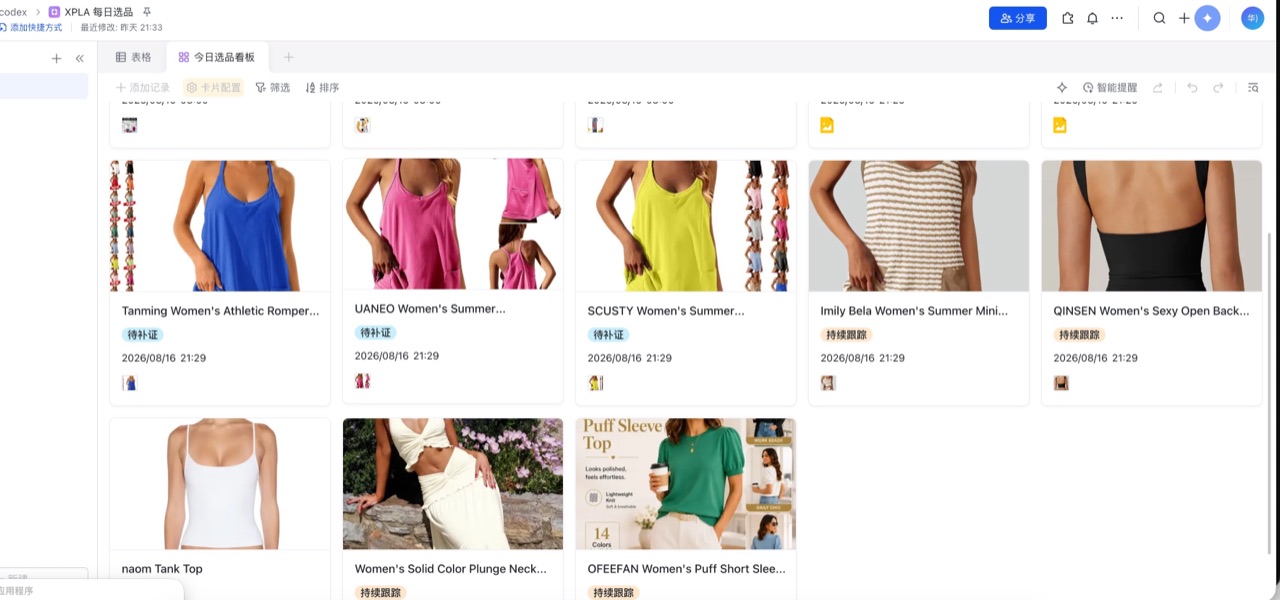
The XPLA Skill turns a bounded US category or keyword into a candidate board. You can inspect source fields, preserve the first snapshot and decide which products deserve deeper work. The shortlist is a decision aid. It is not a prediction of sales, virality, margin or platform approval.
Open the English Skill workflow, or compare XPLA Commerce Skills.
Direct answer
Start with one US category or keyword, a small candidate limit and explicit rejection criteria. Run a dry-run before a paid data request. Preserve collection time, product identity and the source definition of every metric. Compare a later snapshot only when the market, product identifier and field definitions still match.
What one real run proved
The dated evidence record for this workflow contains one US portable blender search from August 16, 2026. That request returned 30 standardized, source-linked product records. One product-detail lookup returned ten related public video URLs.
That evidence proves a bounded first run returned reviewable records and source links. It does not prove current provider availability, sales growth, margin, a winning product or permission to reuse third-party product images and videos.
Use a seven-step research method
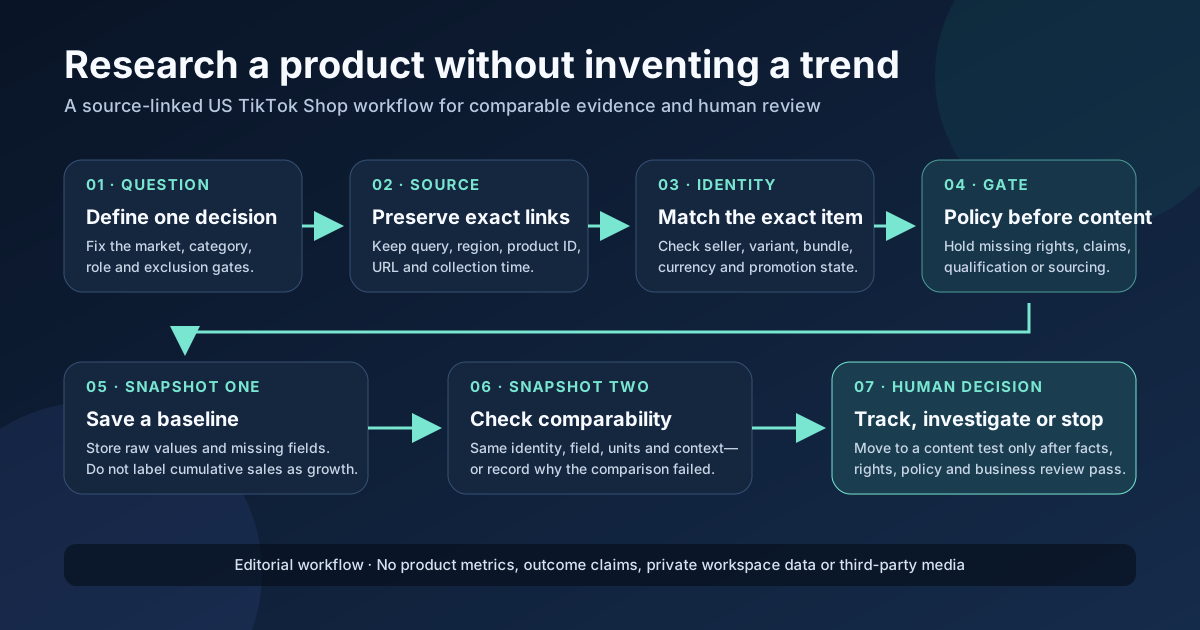
1. Define the decision before the query
Record:
- the US category or keyword;
- seller or affiliate workflow;
- candidate and page limits;
- price, commission or margin assumptions;
- fulfillment and return constraints;
- product-claim and policy risks;
- creative formats the team can actually produce;
- reasons that should reject a candidate.
A large list without rejection rules creates more review work, not better selection.
2. Run a dry-run
Before the first data request, the Agent should show:
- region, category, keyword and exclusions;
- candidate or page limit;
- fields to be collected;
- local output and optional Lark Base destination;
- estimated paid requests when available;
- missing configuration without printing any secret.
Approve the plan only after these values are correct.
3. Save the first snapshot
Preserve:
- product identifier, title and source URL;
- market and collection timestamp;
- observed price and currency when available;
- the sales field with its stated definition;
- shop or creator identifiers when permitted;
- public evidence links;
- unavailable fields as unknown.
Never silently convert cumulative sales into “sales this week.”
4. Inspect one product-detail record
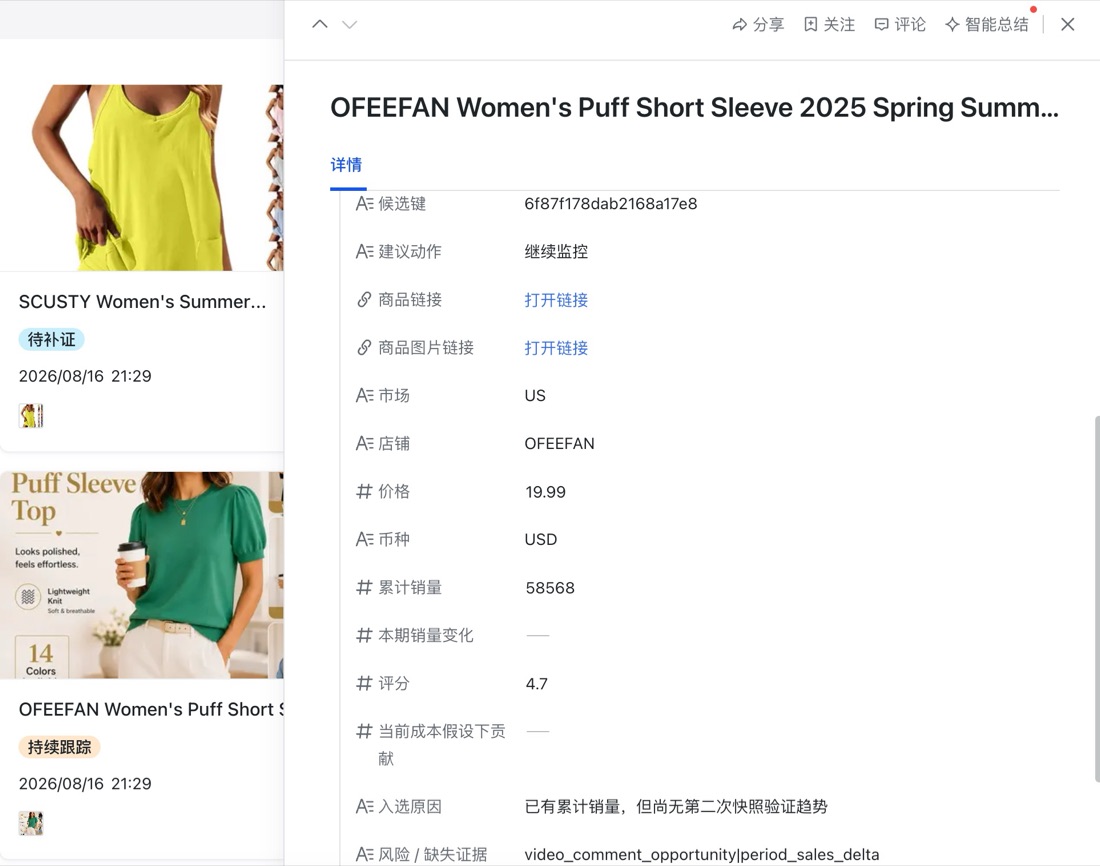
Ask:
- Is the product identity stable across the source and board?
- Is the sales field cumulative, period-based or unavailable?
- Is the item suitable for the target market?
- Can the team obtain and demonstrate it lawfully?
- Are margin assumptions based on verified costs?
- Are claims, safety or platform-policy risks visible?
- Does the item fit the creative formats the team can produce?
5. Keep rejection notes
Useful rejection labels include:
- missing or ambiguous source;
- unsuitable market or fulfillment;
- unsupported product claim;
- weak demonstration potential;
- rights or brand risk;
- economics not yet verified;
- duplicated candidate;
- data too old or incomplete.
Keeping rejected rows prevents the same weak candidate from returning in every research cycle.
6. Compare later snapshots carefully
Repeated snapshots can support change analysis only when product identity, market, units and field definitions remain consistent. Store both collection times. If a product, bundle or source definition changed, record the comparison as invalid instead of forcing a growth number.
7. Hand approved evidence to a separate creative workflow
For an approved product, create a brief containing:
- one customer problem;
- supportable selling points;
- objections;
- demonstrations required;
- claims that must not be made;
- source links;
- suitable video angles.
Then hand the approved brief to the Batch Commerce Video Skill or another production workflow. Research and media generation remain separate approval stages.
What the Skill does—and does not do
| Input | Reviewable output |
|---|---|
| US category or keyword | Candidate set and collection scope |
| Page and candidate limits | Bounded first run |
| Review criteria | Shortlist and rejection notes |
| Supported product link | Product-detail evidence when available |
| Local output settings | Snapshot files under the operator’s control |
| Optional Lark Base configuration | Structured board in the user’s workspace |
The workflow can organize product records, source links and review notes. It does not verify supplier reliability, product compliance, net margin or future demand for you.
Limitations
- One snapshot is not a trend.
- Cumulative sales are not automatically seven-day sales.
- Public video views or likes are not orders or GMV.
- A candidate list does not prove margin, fulfillment, platform approval or future demand.
- A public image or video URL does not grant permission to download, crop, republish or use it in advertising.
- Provider fields, data access and account costs can change and require a fresh check before a scheduled workflow.
- Credentials must remain in the user-controlled environment and must not appear in prompts, screenshots or public logs.
Frequently asked questions
Does this tool find guaranteed winning products?
No. It organizes candidates and evidence for human review.
Is the sales number a daily or seven-day value?
Not by default. Use the definition returned by the source. A fixed-window comparison requires repeated snapshots and a documented calculation.
Can sellers and affiliates use the same board?
They can share evidence fields, but their decisions differ. Sellers may emphasize margin, inventory and fulfillment. Affiliates may emphasize commission, sample access and creative fit.
Can the research run every day?
Only after the first schema and provider behavior are verified. Preserve consistent identifiers, timestamps and fields, and stop if the source or metric definition changes.
Where do results go?
The first run can stay in the local Agent project. Lark Base sync is optional and uses the operator’s configured workspace.
Does it support Codex and WorkBuddy?
Use the package and installation path documented for the selected Agent. Run its environment check before the first paid or external request.
Build one reviewable shortlist
Open the English Skill workflow, select the correct Agent package and run a dry-run. Approve the region, query, limits, fields and destination before collecting the first snapshot.